What is DevOps?
Thanks for joining me! Welcome to my Blog of DevOps. With my personal experience on DevOps, I’d like to share the knowledge, to help others who are starting their career in DevOps. Hope it Helps!
What is DevOps? Collaboration between Developer and Operations in automating the process to Build, Test and Release Software faster, efficiently and effectively in managing the complexity of real world operations.
Historically, There used to be two teams- Development and Operations, having good gap in communication and collaboration in competing their goals. Operations wants development team to do their task efficiently with fewer resources in completing the task. Conversely, Development team wants to complete their tasks with high quality regardless of the resources required. The communication between them sometimes leads to frustrations and takes time.
This made DevOps to evolve, which mainly focuses on business modality. It is regarded as cultural shift, as everyone is aligned to same goals and tasks are transparent from initial stage to final stage. Every single person is inclined to their own task and working together, collaboration the tasks would lead to a common goal. Earlier, both used to have goals which compete with each other, But with DevOps, they both have similar goals.
Below are the 4 major principles that DevOps operates –
- Continuous integration (CI)
- Continuous delivery (CD)
- Continuous testing
- Continuous monitoring

Continuous Integration
Continuous Integration (CI) is a development practice where developers integrate code into a shared repository frequently, preferably several times a day. Each integration can then be verified by an automated build and automated tests. One of the key benefits of integrating regularly is that you can detect errors quickly and locate them more easily.
Continuous Delivery
Continuous delivery is both an extension and an outcome of continuous integration. It’s the process in which software is tested to allow for constant delivery of features. It deploys the artifacts which comes from CI at any point, releasing to test environments and to the production environments, if all the tests are passed
Continuous Testing
To ensure CD, continuous testing is required. This is a process where the application is validated against requirements. If this occurs in a sprint, it’s to ensure the requirements of the sprint have been met. If the tests are failed, it reports to the developers to fix them in the code and the process starts from CI.
Continuous Monitoring
The Operations team manages and makes sure that the application is performing as intended and the environment is stable via continuous monitoring. The operations teams have tools to monitor their environments and systems, These tools make sure that the applications are performing at optimal levels Sometimes the operations team need to work with Dev to build custom monitoring and analytics gathering capabilities built right into the applications being built. This would allow for practical and useful end-to-end continuous monitoring.
DevOps Tools
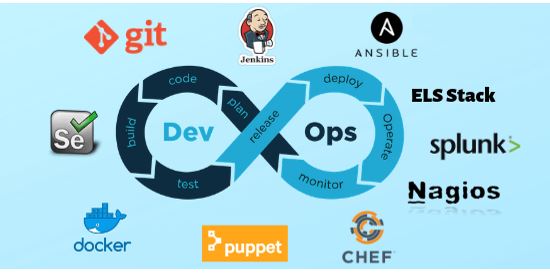
Below are some of the DevOps Tools that are mostly used in industries in 2019 for automated CI/CD in aplications
- Git: Git is one of the most popular DevOps tools, widely used across the software industry. It’s a distributed SCM (source code management) tool, loved by remote teams and open source contributors. Git allows you to track the progress of your development work. You can save different versions of your source code and return to a previous version when necessary. It’s also great for experimenting, as you can create separate branches and merge new features only when they’re ready to go.
- Jenkins: Jenkins is the go-to DevOps automation tool for many software development teams. It’s an open source CI/CD server that allows you to automate the different stages of your delivery pipeline. The main reason for Jenkins’ popularity is its huge plugin ecosystem. Currently, it offers more than 1,000 plugins, so it integrates with almost all DevOps tools, from Docker to Puppet.With Jenkins, you can iterate and deploy new code as quickly as possible. It also allows you to measure the success of each step of your pipeline.




- Gradle: Gradle is an open-source build automation system that builds upon the concepts of Apache Ant and Apache Maven and introduces a Groovy-based domain-specific language (DSL) instead of the XML form used by Apache Maven for declaring the project configuration. Gradle uses a directed acyclic graph (“DAG”) to determine the order in which tasks can be run.
Gradle was designed for multi-project builds, which can grow to be quite large. It supports incremental builds by intelligently determining which parts of the build tree are up to date; any task dependent only on those parts does not need to be re-executed.
Gradle is a flexible and powerful build tool that can easily feel intimidating when you first start and flexible enough to build almost any type of software. - Docker: Docker has been the number one container platform since its launch in 2013 and continues to improve. It’s also thought of as one of the most important DevOps tools out there. Docker has made containerization popular in the tech world, mainly because it makes distributed development possible and automates the deployment of your apps. It isolates applications into separate containers, so they become portable and more secure. Docker apps are also OS and platform independent. You can use Docker containers instead of virtual machines such as Virtual Box.
- Kubernetes: Kubernetes is a container orchestration platform that takes containerization to the next level. It works well with Docker or any of its alternatives. Kubernetes is still very new; its first release came out in 2015. It was founded by a couple of Google engineers who wanted to find a solution to manage containers at scale. With Kubernetes, you can group your containers into logical units. You may not need a container orchestration platform if you have just a few containers. However, it’s the next logical step when you reach a certain level of complexity and need to scale your resources. Kubernetes allows you to automate the process of managing hundreds of containers
- Bamboo: Bamboo is Atlassian’s CI/CD server solution that has many similar features to Jenkins. Both are popular DevOps tools that allow you to automate your delivery pipeline, from builds to deployment. However, while Jenkins is open source, Bamboo comes with a price tag. Bamboo has many pre-built functionalities that you have to set up manually in Jenkins. This is also the reason why Bamboo has fewer plugins (around 100 compared to Jenkins’ 1000+).
- Puppet Enterprise: Puppet Enterprise is a cross-platform configuration management platform. It allows you to manage your infrastructure as code. As it automates infrastructure management, you can deliver software faster and more securely. Puppet also provides developers with an open-source tool for smaller projects.
- Ansible: Ansible is a configuration management tool, similar to Puppet and Chef. You can use it to configure your infrastructure and automate deployment. Its main selling points compared to other similar DevOps tools are simplicity and ease of use. Ansible follows the same Infrastructure As Code (IAC) approach as Puppet. However, it uses the super simple YAML syntax. With Ansible, you can define tasks in YAML, while Puppet has its own declarative language.
- Nagios: Nagios is one of the most popular free and open source DevOps monitoring tools. It allows you to monitor your infrastructure so that you can find and fix problems. With Nagios, you can keep records of events, outages, and failures. You can also keep an eye on trends with the help of Nagios’ graphs and reports. This way, you can forecast outages and errors and detect security threats.
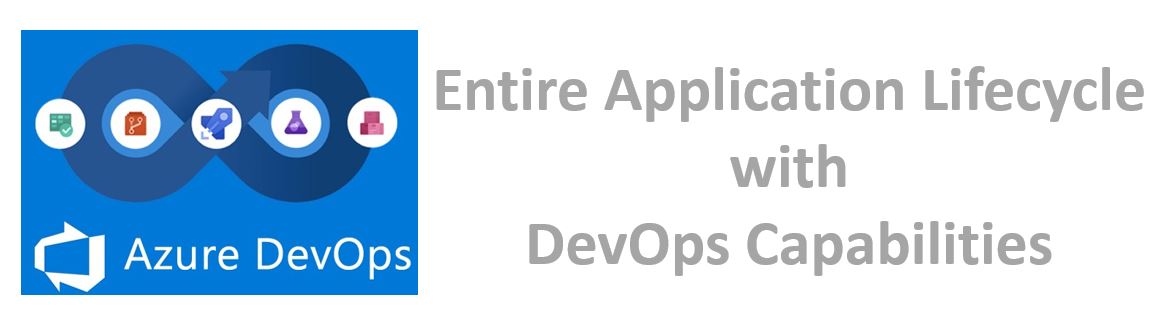
- Azure DevOps: Azure DevOps (formerly Visual Studio Team Services) is a hosted service providing development and collaboration tools. Azure DevOps has a lot of inbuilt functionality that allows teams to get up and running with managing their project and automating their workflows to increase productivity with a very short initial learning curve. Almost, all the features are covered in developing an application. Below are the features –
- Git repositories for source control
- Build and Release pipelines for CI/CD automation
- Agile tools covering Kanban/scrum project methodologies
- Many pre-built deployment tasks/steps to cover the most common use cases and the ability to extend this with your own tasks.
- Hosted build/release agents with ability to additionally run your own
- Custom dashboards to report on build/release and agile metrics.
- Built in wiki
 DevOps